One of the things I like about Vim is its support for syntax highlighting and folding. Especially when reviewing or editing config-files, the coloring is a true relieve. (Yes, I am aware that emacs can do this much better, nicer, easier and with a lot more Meta-Control sequences.)
Googling for a syntax file which would color the Cisco configuration files for me didn’t get me very far. So I decided to run my own. Here is the result:
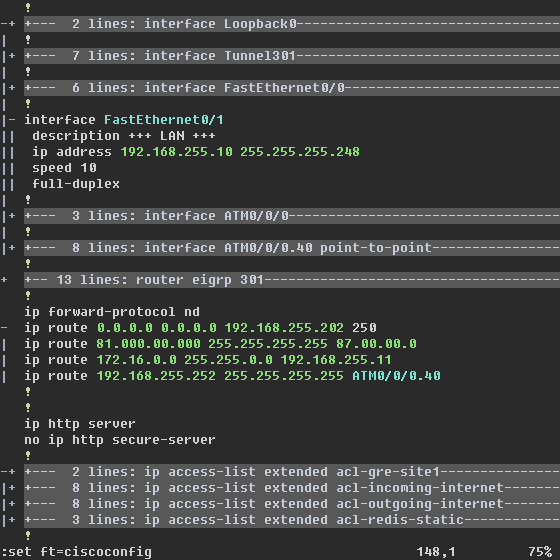
(Public IPs in the screenshot are masked by 0’s)
The goal was to aid in reading a config file, not to provide error-checking when writing one. The script checks for often used tokens and colors them. The recognized tokens are:
- Comments (start with an ! mark)
- IP addresses (only IPv4 currently)
- Interface names. All variants that I came across are included, but the list will certainly be incomplete.
Besides tokens, the script also checks for groups of commands to fold them together:
- username statements
- ip host statements
- interface statements (all interfaces folded together; then each interface subfolded)
- router statements (all routing protocols folded together; then each protocol subfolded)
- ip route statements
- ip access-list statements and old access-list statements (all access-lists folded together; then each access-list subfolded)
- route-map statements (all route-maps folded together; then each route-map subfolded)
- crypto isakmp statements
- crypto isakmp key statements
- crypto ipsec transform-set statements
- crypto map statements
Update 2009-07-11
Added some minor improvements to the config-script. I also wrote a seperate script to fold routing tables (sh ip route).

Guest says:
How do I actually use it?
I copied the script into .vim/plugin/cisco.vim. Tried couple of times with different versions of vim (7.1.138 ), gvim and it does not seem to work?? Any ideas?
2008-07-15, 2:10Niobos says:
I (have to) use Windows, so I’ll start out giving the GVim for-windows explanation:
I placed the file in my HOME-drive (being H: on my machine) in H:\vimfiles\after\syntax\ciscoconfig.vim
For *nix based setups, it’ll fit in ~/.vim/syntax/ciscoconfig.vim
I didn’t configure vim to automatically detect the filetype, so I manualy type “:set ft=ciscoconfig” whenever I want to. The reason behind this is that most of the config-files resides somewhere in a bigger log-file.
2008-07-16, 17:33If you want Gvim to automatically detect the file, see this topic: http://vimdoc.sourceforge.net/htmldoc/filetype.html#new-filetype
Niobos says:
Post Update: added some more crypto-related syntax-detection
2008-07-16, 17:34Chris says:
Hi,
2008-07-22, 15:37I get an error on line 21: Error 401 and 475
🙁
Niobos says:
During the copy paste, somehow the ATM-line fell out. I corrected that.
2008-07-23, 16:14Could you try again?
Broeisi says:
Niobos,
This looks great, but in vim 7.0 whenever is invoke this colorscheme the interface statements and ip route statements disappears.
The class map and policy map also doesn’t colour.
Can you assist maybe?
Cheers,
Broeisi
2008-09-09, 11:18Niobos says:
Broeisi,
I’m not sure what you mean by “disappear”. Could it be the Folding taking place? (put the cursor on the line and type “zR”, without quotes and with correct capitalization)
Class maps and policy maps don’t color because I didn’t write the rules for them yet. If you send me a (piece of) a config file with a bunch of class/policy maps, I’ll try to get these colored/folded as well.
2008-09-09, 18:46Broeisi says:
Niobos,
I will send you a piece of a config file with class/policy maps.
Better… if you want I can sent you a whole config and that way you (and I :)) can color the whole cisco config.
I was about the learn how to do syntax highlighting in vim, because lots of colleagues wanted such syntax highlighting.
Sent me your email at my email address please..
That way we can communicate better.
P.S. the “zR” didn’t help….. but is this syntax file for vim or gvim?… I understand that there is a slight difference between a syntax file for the two.
2008-09-10, 9:40Niobos says:
The syntax file should work for both vim and gvim, although I only tested it in gvim.
You should have received an email to arrange for the config file.
2008-09-10, 20:37Niobos says:
Post Update: added folding of class-map’s and policy-map’s
2008-09-22, 17:27Zoly says:
I work on a syntax highlighter for blog posts, same thing –> none found on Internet yet. Took a look in your code for the IP address Regex. Thanks!
2010-11-29, 16:36VP says:
Wondering why its not working for me?
I tried other syntax highlights like Javascript, and they are working.
I have created ciscoconfig.vim at this path –> C:\Program Files (x86)\Vim\vim72\syntax
Nothing happens when give command :set ft=ciscoconfig.
Please help
2012-12-19, 13:22Niobos says:
VP,
You normally put your own config-files in your own path, not in the system path (although that should work as well). Have you tried putting them in your user-directory (http://agateau.com/2007/10/04/note-to-self-path-to-vim-files-on-windows/ might help in finding it).
2012-12-19, 14:20VP says:
Not verse with systems, I did a small test.
Removed javascript from C:\Program Files (x86)\Vim\vim72\syntax
And Java’s code highlight stopped working.
Then again when I copied the file back, Javascript highlight started working.
This ensures that Gvim is referring this path only.
2012-12-20, 14:22Still not working.
Sam Garcia says:
I have a large number of router configs that have class maps. I tried to copy your interface line to fold the class-maps. I keep getting an E475 error “invalid argument” Any help would be greatly appreciated.
thank you
Sam
2017-11-15, 20:29Niobos says:
Sam,
Can you post more information about your error. Does it say on what line of what file the error occurred? What do you mean by “your interface line”?
2017-11-15, 20:41Sam Garcia says:
Hey, thanks for the quick response. Here is an example for the class-maps, see below. I’d like to fold them in a similar manner to how you folded the interfaces. I just made a copy of the interface code and changed the keywords to “class-maps”
class-map match-any DSCP_Trusted_Hosts
2017-11-16, 17:35description Marking Class for Hosts with Trusted Markings
match access-group name DSCP_Trusted_Hosts